 MeshPit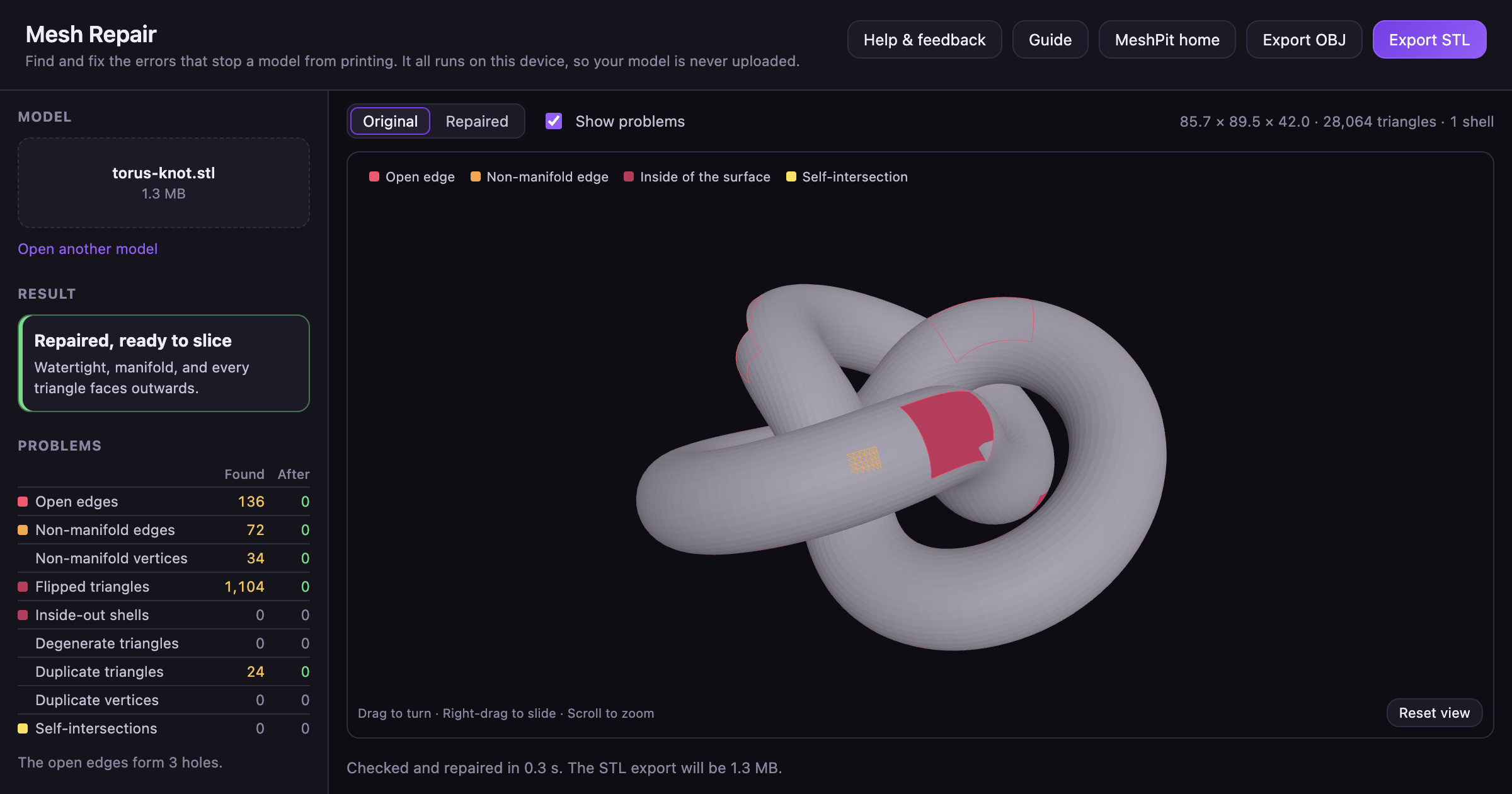
Why an STL file won't slice
An STL file is a list of triangles. To print, those triangles have to enclose a solid. Every edge must be shared by exactly two triangles, and every triangle must face outwards. Sculpted models, 3D scans and parts merged together often break these rules, and so do some downloaded files.
How to repair an STL file
- Open Mesh Repair and choose an STL or OBJ file, or drop one onto the page.
- Mesh Repair checks and repairs the model straight away, with every repair turned on. The Problems table lists what it found and what is left after the repair.
- Switch between Original and Repaired above the preview. Tick Show problems to mark open edges, non-manifold edges and self-intersections. The inside of the surface shows in dark red, so flipped triangles and holes stand out.
- When the result reads Repaired, ready to slice, click Export STL or Export OBJ.
Turn a repair off under Repairs and Mesh Repair runs again without it. In MeshPit Desktop, Repair Mesh in a model's details opens the same tool, and the repaired copy saves beside the original.
The problems Mesh Repair finds and fixes
| Problem | What it is | What Mesh Repair does |
|---|---|---|
| Duplicate vertices | Corners at the same place that should be one, which leave cracks between triangles. | Welds corners closer than the weld distance, which closes the cracks. Leave the distance blank and MeshPit picks one from the size of the model. |
| Degenerate triangles | Triangles with no area, from a repeated corner or three corners in a line. | Removes them, and splits a neighbouring triangle where needed so no gap opens. |
| Duplicate triangles | Triangles on the same three corners as another. | Removes the copies. Two copies facing opposite ways form a wall with no inside, and both go. |
| Non-manifold edges | Edges shared by more than two triangles. | Pairs up the triangles round the edge, so two cubes touching along an edge become two closed cubes. Where solids overlap rather than touch, it leaves the edge alone. |
| Non-manifold vertices | Points where separate parts of the surface touch. | Gives each part its own copy of the point. |
| Flipped triangles | Triangles facing the opposite way from their neighbours. | Turns them to match the rest of their shell. |
| Inside-out shells | Closed parts whose every triangle faces inwards. | Turns them the right way out, unless another shell encloses them, since the inner wall of a hollow should face in. |
| Holes | Loops of open edges, which have a triangle on one side only. | Closes each hole with new triangles. It refuses a patch that would cut through the model, and leaves that hole open and reports it. |
| Self-intersections | Triangles in one part that pass through each other. | Cuts out the crossing triangles and closes the gap. Separate parts that overlap are left alone, because slicers merge them. |
When a repair makes things worse
A fix that is right in general can still leave a particular model worse. So Mesh Repair compares every result with the original. If the result has more open edges, more non-manifold edges or more crossing triangles, or a closed model's volume changed, it runs again without the fixes that can open the surface. If that is still worse, it runs once more and fixes only the normals. The notes under the preview say when this happened.
When to go back to the original model
If problems remain after the repair, the model may be too broken to fix automatically. A hole whose patch would cut through the model stays open, for example. Fix the model or export it again from the program it was made in, then run it through Mesh Repair once more.
Questions
What does non-manifold mean in an STL?
A non-manifold edge is shared by more than two triangles, and a non-manifold vertex is a point where separate parts of the surface touch. A slicer can't tell which side of such a surface is inside, so it may leave out walls or fill gaps. Mesh Repair pairs up the triangles round each of these edges and points, so two parts that only touch become two closed parts.
How do I fix flipped normals in an STL?
Open the file in Mesh Repair with Fix flipped and inside-out normals ticked, which it is by default. It turns each flipped triangle to match the rest of its shell, and turns a closed part that faces inwards the right way out.
Can I repair an OBJ file?
Yes. Mesh Repair opens STL and OBJ files and saves the repaired model as either.
Is my model uploaded when I repair it?
No. Mesh Repair reads, repairs and saves the model in your browser, so it never leaves your computer, and you don't need an account.